From: Harry P. Baya 3rd [ harry at baya.net ] Future_Baya_family_website.doc
Date: July 26, 2020
Subject: Downloading and accessing a copy of the Baya Family Website
The Baya family website currently lists all of the Baya family members, spouses and children starting with Harry P. Baya Sr (1870-1949) through the most recent birth (Findley McIntrye Baya, born Jan 7, 2018). For most of those listed there is a link to a PDF file containing information about their parents, marriages and children. Those PDF files were sent to me by my cousin Emery Edward Baya. He has entered data into a program called “Family Tree Maker” and used that program to create the PDF files.
The web address (URL) for that website is: http://boppers.net/baya_family/
In Summary:
- Users can download a single zipped file containing the current web site files [ click here for tutorial video ]
- Users can use the zipped file to get a copy of the current web site files [ click here for tutorial video ]
- Users can use a web browser, such as Google Chrome, to view the Baya Family website stored in the downloaded files. [ click here for tutorial video ]
- These downloaded files can be used as a stored backup copy of the Baya Family website.
- This web page gives instructions for downloading, unzipping, and viewing the Baya Family website files
My goal was to create a web page and supporting files that could be used by Baya family members alive today and their future descendants. This Baya Family website is on my personal web domain, Boppers.net, and will probably not remain available after I die. This memo explains how any user can save a backup copy to their personal computer.
Users with the appropriate expertise (see tutorial videos in the Summary section above) can easily download a copy of all the files in the Baya Family website at any point in time and then use the downloaded files to :
- Create a duplicate copy of the website elsewhere on the internet.
- View the website “off line” – i.e they can use a browser such as Google Chrome to view the site on their home computer without needing access to the internet. This would allow someone interested in Baya family history to have their own copy of the website. They could also give copies of this website to others. It breaks the dependence on internet access to a particular online website.
The file that can be downloaded is a single “zipped” file that combines all of the website files into one compressed file. Instructions for downloading the “zipped” Baya Family website file are given below.
The zipped file can be used to produce a copy of all the files used in the website. Many people with some technical computer expertise know how to “unzip” a zipped file to create the files that it contains. You may need help with this. I have provided a link to a video showing how to unzip a zipped file.
Once the file is unzipped a non-technical user can use a browser, such as Google Chrome, to view the website on a home computer. Instructions for using a browser to view the downloaded files are given below.
Why store the Baya Family information in the form of a website files?
The contents of the Baya Family website could be stored in numerous forms. The most obvious one is printed pages. It could also be stored in digital files such MS Word documents, PDF files and other formats. I chose to use a website format (i.e. HTML files and the files they can access) for two reasons:
- I have the ability to make this webpage accessible on the internet now. This allows me to immediately share the Baya family information with other family members.
- I believe web page files, including those in the Baya Family website, will continue to be viewable by future generations. This makes it a good long-term storage format.
How to download the zipped file containing the Baya family website files.
Click here for video tutorial
This explains in words how to download the files. The web link at the end of this explanation will play a video showing the process.
The screen captures below show the steps to use the Google Chrome browser to download the “zipped” Baya family website file.
Go to this web address: http://boppers.net/baya_family_zip/
You will then see something like this on your screen:
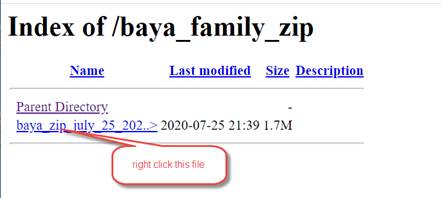
After right clicking the file name”
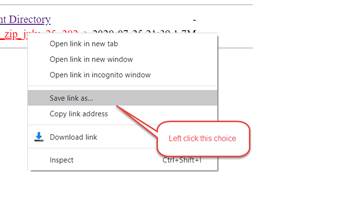
Left clicking “Save link as” will allow you to download the zipped file to a location of your choice:

That completes the process of downloading the zipped file
Here us a link to a video showing the process of downloading the zipped file containing the Baya Family website files: Click for video.
How to unzip a zipped file.
Here is a link to a video showing how to unzip the zipped file downloaded from the baya_family_zip web page. Click for video
An alternative is to ask a techie friend to help you with this process.
How to use a browser to view a website stored on your computer.[ i.e. How to open an HTML file stored on your computer]
These Click here for video tutorial.
These instructions show you how to open the Baya Family Website on your home computer after you have downloaded the zipped file and unzipped it to make the website files available.
In essence what you need to do is use a web browser, like Google Chrome, to open an HTML file (e.g. baya_family_website.html) stored on your home computer. Though the primary function of a web browser is to view web pages stored on remote internet servers, they can be used to view web pages stored on home computers.
The web link at the end of this explanation will play a video showing the process described below.
The screen captures below show how to use the Google Chrome Browser to open the Baya Family website downloaded on July 25, 2020.
Unzipping the downloaded file will create a folder named “baya_family_download_folder”. I put that folder in a folder named “open_html_file_demo” as shown in the screen capture below. You can put it anywhere you like, but you will need to navigate to it later.
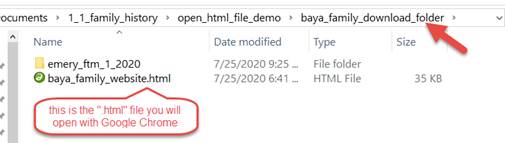
Launch the Google Chrome browser and left click in a blank area anywere near the middle of the screen. This is so that the step below will work as desired.
Then type Ctrl-o [ hold down the “CTRL” key and tap the “o” key ]
This will bring up an “Open” dialog box for opening a file.
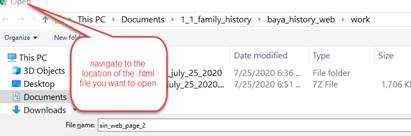
I navigated to “open_html_file_demo/baya_family_download” folder:
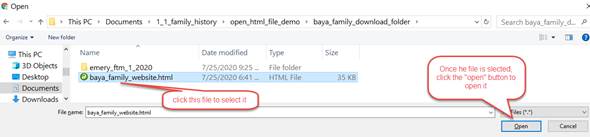
Clicking the “Open” button will open the Baya Family website on your screen. You will then be viewing the website that is now stored on your computer. You will not be using the internet to do this. This allows you to view the website without having to depend on (1) a particular online website and (2) access to the internet.
This video liink show the process of opening the Baya Family website downloaded from the “baya_family_zip” web site. Click for video showing use of browser to open an HTML file